
The Ritual
I have done a weekly review at work for years. Long before the AI engineering explosion, it was a ritual: sit down, go through the calendar, work out what next week actually needs from me, book the meetings.
By this June I was doing it with Claude Code, and I noticed I was not saving much time. I was going back and forth, feeding it context, steering it turn by turn. The point of AI is to get the time back. I was still the one doing the prompting.
So I built a loop and let it run for eight weeks.
What I got back was a list of meetings. Who to meet, when, and it was correct. However, the stakeholder analysis was not there, and neither was the influence work. The loop had done exactly what I told it to do, which was schedule the meetings.
That is the part nobody warns you about. The mechanics are trivial. What is not trivial is being clear about the goal, the outcome you want, and why you want it, in a way the model can actually work from.

Figure 1. Weekly Review loop that ran exactly as designed. The red box is the part of my job it never touched.
Everyone says agents are just while loops
✅ Step 1. Prompt engineering is the words you send the model. You ask, the model answers, you decide what to ask next.
✅ Step 2. Context engineering is everything the model can see when it answers: the documents, the conversation so far, the tools it can call, the notes it kept from last time. You are still the one asking.
💡Step 3. Loop engineering takes you out of the querying. You define a goal and a stopping condition, and a system runs the agent through act, observe, decide, repeat until one of the two is satisfied. Addy Osmani, who named the practice in June, put it in one line: loop engineering is replacing yourself as the person who prompts the agent, and designing the system that does it instead.
That is the whole idea. Which is why the backlash was immediate. The Hacker News thread ran past 1,800 comments on a single point: an agent is a while loop with an LLM call in the body. There is now an entire school of thought to map AI vocabulary back to computer science fundamentals that it renamed!
In January 2026, five months before any of this had a name, Geoffrey Huntley published a post arguing that everything is a ralph loop. His description of the pattern is deflationary on purpose: you allocate the array with the required specifications, give it a goal, and loop the goal. He is also explicit that it counts whether you run the loop by hand through prompting or automate it, because the point is getting the most out of how the models work, and that the pattern is generic enough to apply to all tasks rather than just code.
So yes. You could write the control flow on an index card. I had been running this loop by hand for years, and the hard part was never the scheduling. It was the stakeholder analysis and the influence work, and automating the loop meant writing that down.
How to build one
Every loop has five parts: A trigger starts it. A goal says what the loop is for. Tools are what it can use: your calendar, your email, a repo. A verifier looks at the output and decides whether it is good enough. A stop rule ends the run.
Four of those you already know from any automation you have set up. The verifier is the one that’s new and non-trivial to build.
The four kinds of loop are really four kinds of trigger.
- Cron fires on a schedule. Mine runs Friday afternoon. It reads my calendar and my inbox. Then it tells me what next week needs from me: the 1:1s where I owe someone something, the documents I said I would write and have not, the agents I said I would build and have not, the conversations that have to happen before Monday's sync so the room is already aligned when I walk in, and what I did this week that is worth writing down as impact before I forget it.
- A hook fires when something changes. A spec gets merged. The loop turns it into user stories with acceptance criteria. An engineer edits them instead of writing them from scratch. I have not built this one. I am describing it because it is the loop most worth raising with your engineers, and because of how it fails.
- A heartbeat watches and stays quiet. Mine follows competitor investor updates: what they say on earnings calls, how they describe their own roadmap this quarter compared to last. It speaks only when something moves.
- A goal loop runs until a condition is met. Point one at an AI feature you have shipped. Failures in production become test criteria. The loop keeps going until the tests pass.

Figure 2. Anatomy of an agent loop: five parts, four trigger types.
You do not need to write code for this
Mine runs on Claude Code's scheduled tasks, which is a form in a sidebar rather than a script. In the Desktop app, open the Code tab, click Routines, then New routine, and pick Local. Give it a folder, a schedule, and the instructions you would give a colleague who was covering for you.
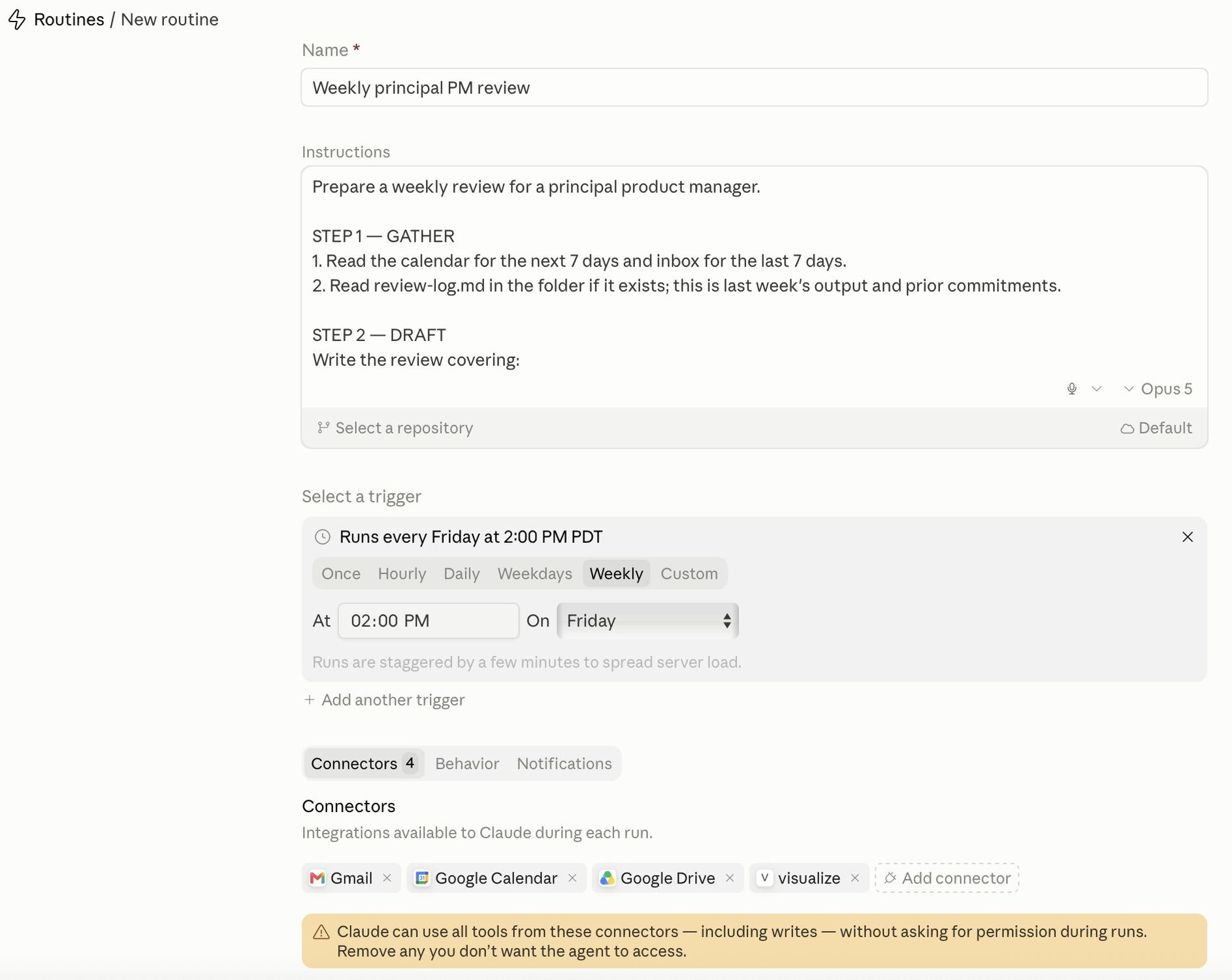
Figure 3. Weekly Review Routine
The agent loop design across Claude Code, Codex, and Hermes is quite similar:
- Claude Code. Two commands and a scheduler. /goal sets a completion condition and Claude keeps working toward it without you prompting each step, with a small fast model checking after each turn whether the condition holds. /loop re-runs a prompt on an interval. Routines and scheduled tasks fire without a session open. This is what mine runs on.
- Codex. Automations run recurring tasks in the background and add findings to an inbox, or archive the task automatically if there's nothing to report. Goals, shipped in April, keep a thread working toward a defined outcome across turns. For project-scoped automations the machine has to be powered on and Codex running when the schedule fires.
- Hermes. Shipped its own /goal on May 2, explicitly crediting Codex's implementation, keeping a goal alive across turns until it's achieved.
And for loops that don't touch code at all: ChatGPT's scheduled tasks handle recurring work and monitoring, and can use connected apps like Gmail. Zapier and n8n have run trigger-based workflows for years and now hand off to a model mid-flow.
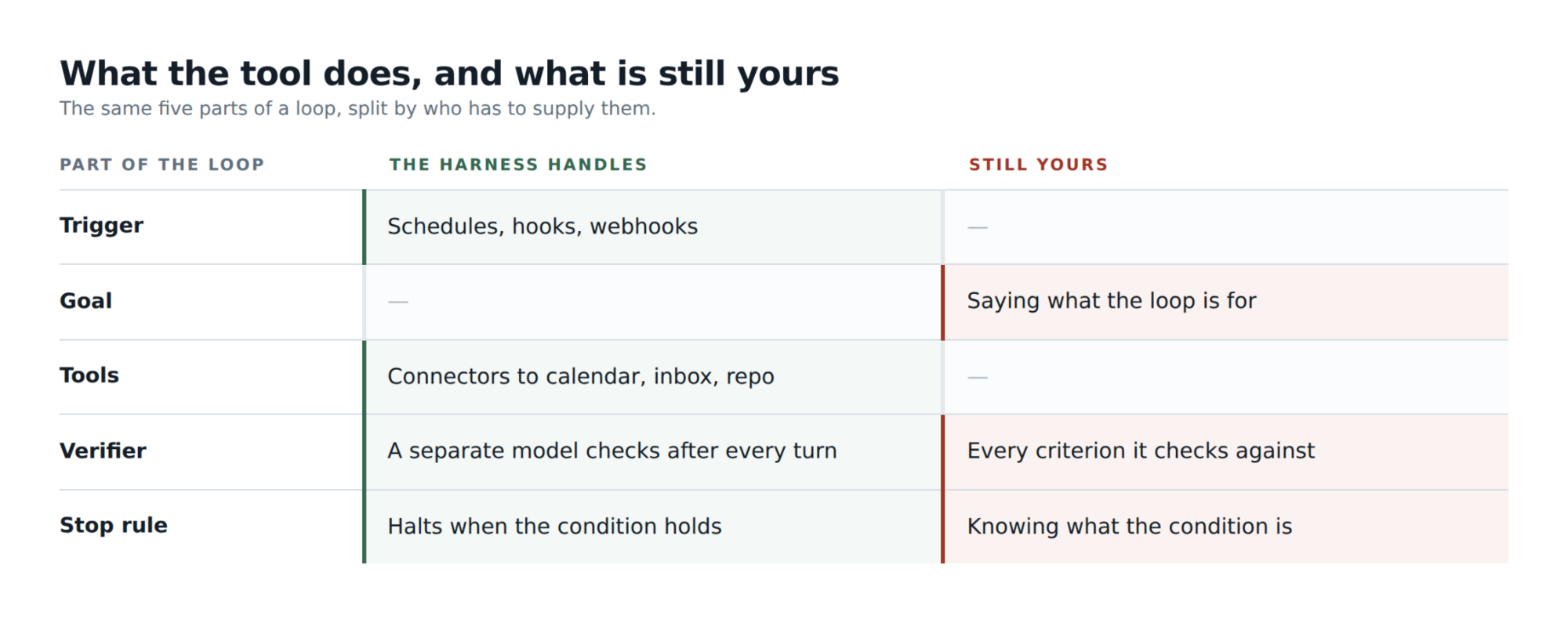
Figure 4. What the agent loop harness handles vs. the user.
What I found when I tried to write the quality bar down
I expected the hard part to be the code. Triggers, tool permissions, a schedule. However, that was quick. The hard part was that to hand this off, I had to state what a good weekly review is. And I could not.
This is because it turned out to be three things tangled together. There was knowledge: who my stakeholders are, what each of them cares about, which ones have absorbed work before. There were frameworks: how I prioritise, how I think about persuasion, what makes an ask land. And there were examples, which is the part I had never once articulated, because examples are what you have instead of a rule when you have been doing something so long you stopped noticing you were doing it.
So I wrote a version. Ran it. Read the output. Disagreed with it. What came back was a list of meetings. Who, and when, and it was correct. It was also missing most of the job. No stakeholder analysis, nothing about the influence work, which is the part that decides whether the meeting was worth holding. The output had done exactly what I asked for.
This is the part the explainers skip. Every guide says define a goal and a stopping condition, then moves on as though defining them were the easy step. For code it nearly is: the tests pass or they don't. For judgment work the stopping condition does not exist yet when you sit down to write it. It exists as your reaction to output you have not seen. You cannot specify it in advance. You discover it by running the loop and noticing where you disagree. Which is where the verifier comes in.
The verifier is where you put the standard once you have found it. Every time I read an output and disagreed, that disagreement was a check I did not know I had: this meeting has no purpose, this impact line is an activity and not an outcome, this commitment from last week quietly disappeared. Those are not preferences. They are rules, and now they are written down and pointed at a second pass that only sees the finished review and has one job, which is to reject.
That last part matters more than it sounds. An agent asked to grade its own work tends to praise it, and tuning a separate sceptical evaluator is more tractable than making a generator critical of itself.
When you draft the spec for an agent loop, write down the examples too. Not just what good looks like, but what you rejected and why. That is the part I had to discover by running the thing, and it is the part your engineers cannot guess.
It is also the fastest way to teach them what great looks like. The rejections are the standard. Write them down while you can still remember disagreeing.
Do’s and Don’ts
After months of running this left me with a short list to live by when using Loop engineering in my workflow.
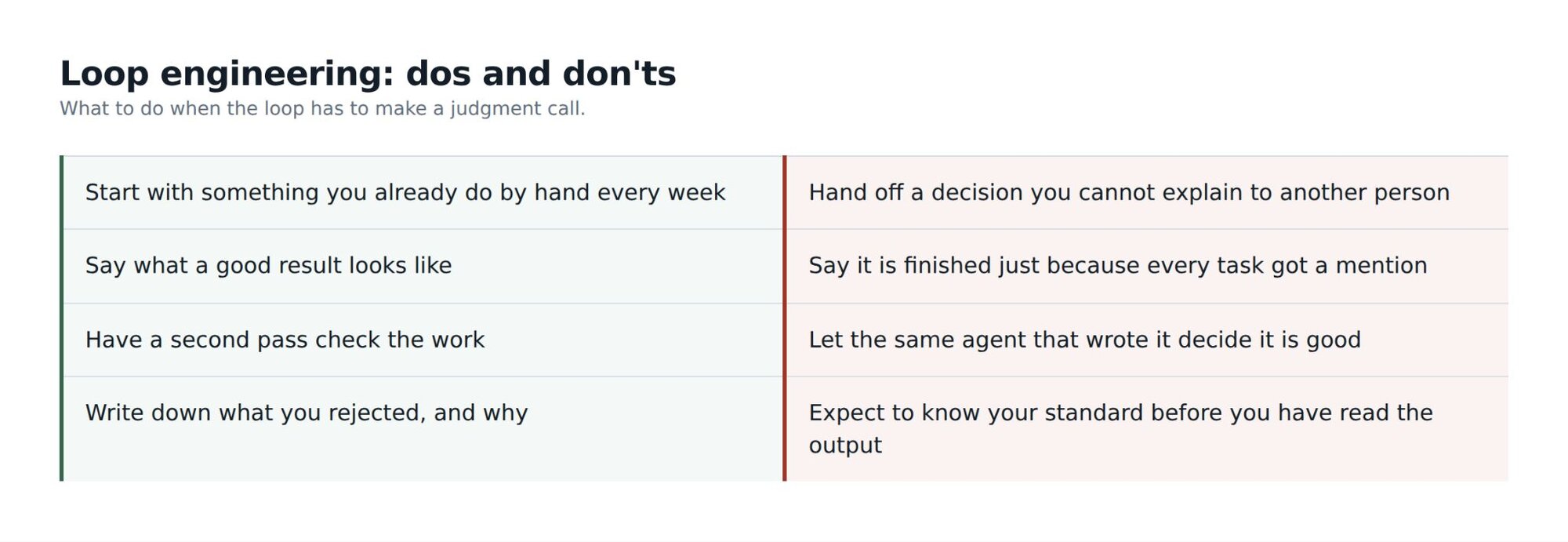
Figure 5. Loop Engineering Do’s and Don’ts
The people who get value from loop engineering are the ones who can say what good looks like. Specific enough that a model can act on it, and specific enough to reject an output that misses the mark. That is not something you develop just through years of experience. I had the standard for a decade and still could not write it down until I read a weekly review I disagreed with. It requires taste and judgement. The loop is the easy half. The standard is yours, and nobody else can write it for you.
Further reading
- Huntley, G. (2026, January 17). everything is a ralph loop. https://ghuntley.com/loop/
- Osmani, A. (2026, June 22). Loop engineering: Designing loops that prompt coding agents. O'Reilly Radar. https://www.oreilly.com/radar/loop-engineering/
- Anthropic. (2026). Routines in Claude Code. https://code.claude.com/docs/en/routines
- Steinberger, P. (2026, June). Peter Steinberger vs. Boris Cherny. https://x.com/mvanhorn/article/2063865685558903149?lang=en
